Start with the essentials.
Choose your products, adapt a work-type template and build up the estimate.

Bring your materials, labour costs and pricing into one workflow. Review your margins, create quotations and raise invoices with SmartEstimate by Besteld.
For small contractors, specialist suppliers and service businesses using their own costs and rates.
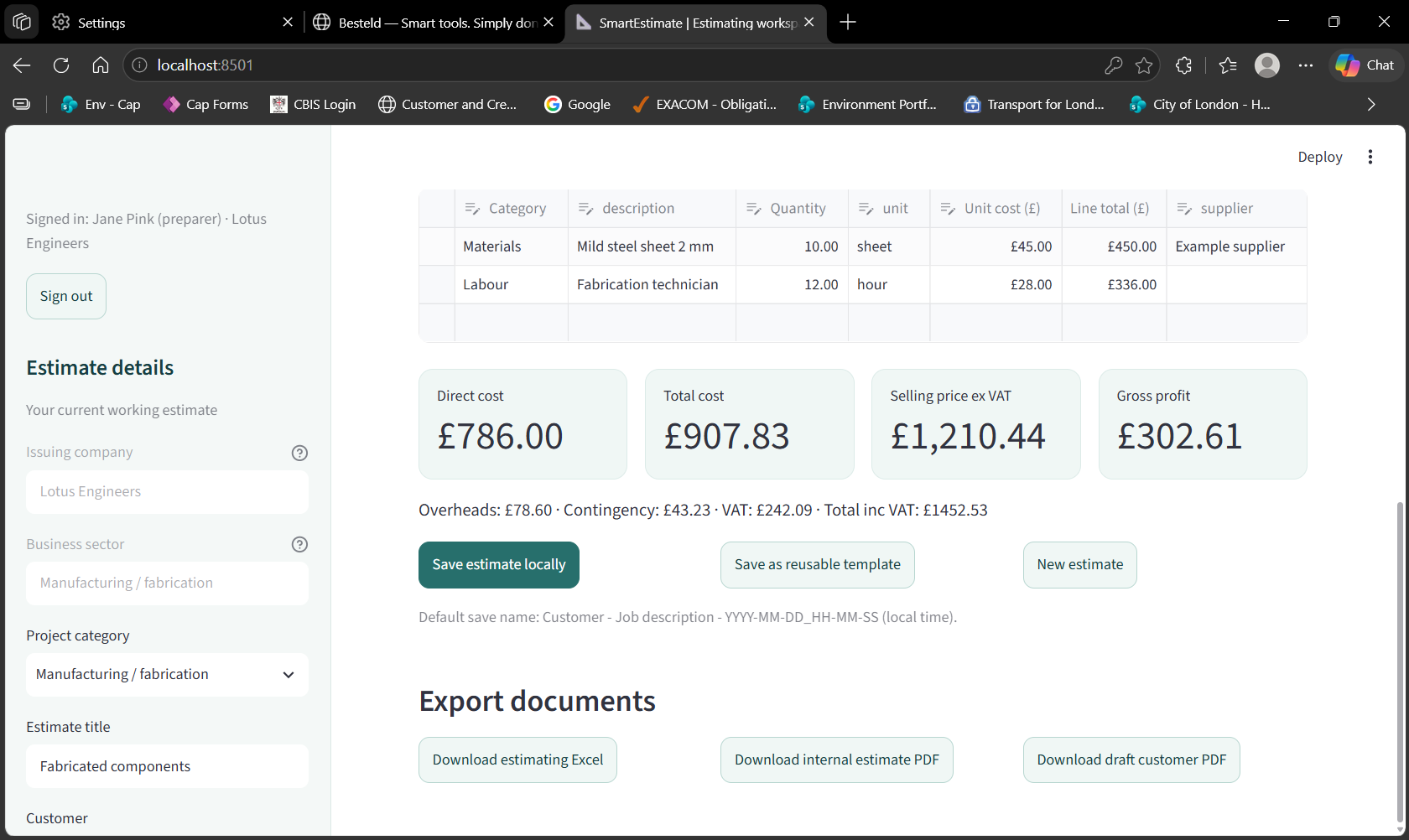
Real application screen · fictional company and example figures
View larger product screens ↗
Build estimates from your own catalogue, reuse work-type templates and review costs before producing a customer quotation. Then invoice the full quotation, a deposit or a stage of the job.
Spend less time piecing together paperwork, and more time reviewing the details that matter.
Request a demo ↗Maintain product information and prices in one place. Use the built-in internet search to find products, review the details and add them to your catalogue for future estimates.
Save and retrieve templates by work type, then adapt them to the job in front of you.
On Small Business, choose whether a different named user must approve quotations and invoices. Individual users prepare and approve their own documents. Both plans retain approval audit trails and revision locking.
Generate and download approved PDFs and keep issue history. Share downloaded documents using your preferred email application.
Ask us about the current release, setup requirements and the right workflow for your business.
Choose your products, adapt a work-type template and build up the estimate.
Send the draft through approval before generating the final quotation.
Download the approved PDF and send it to your customer using your preferred email application.
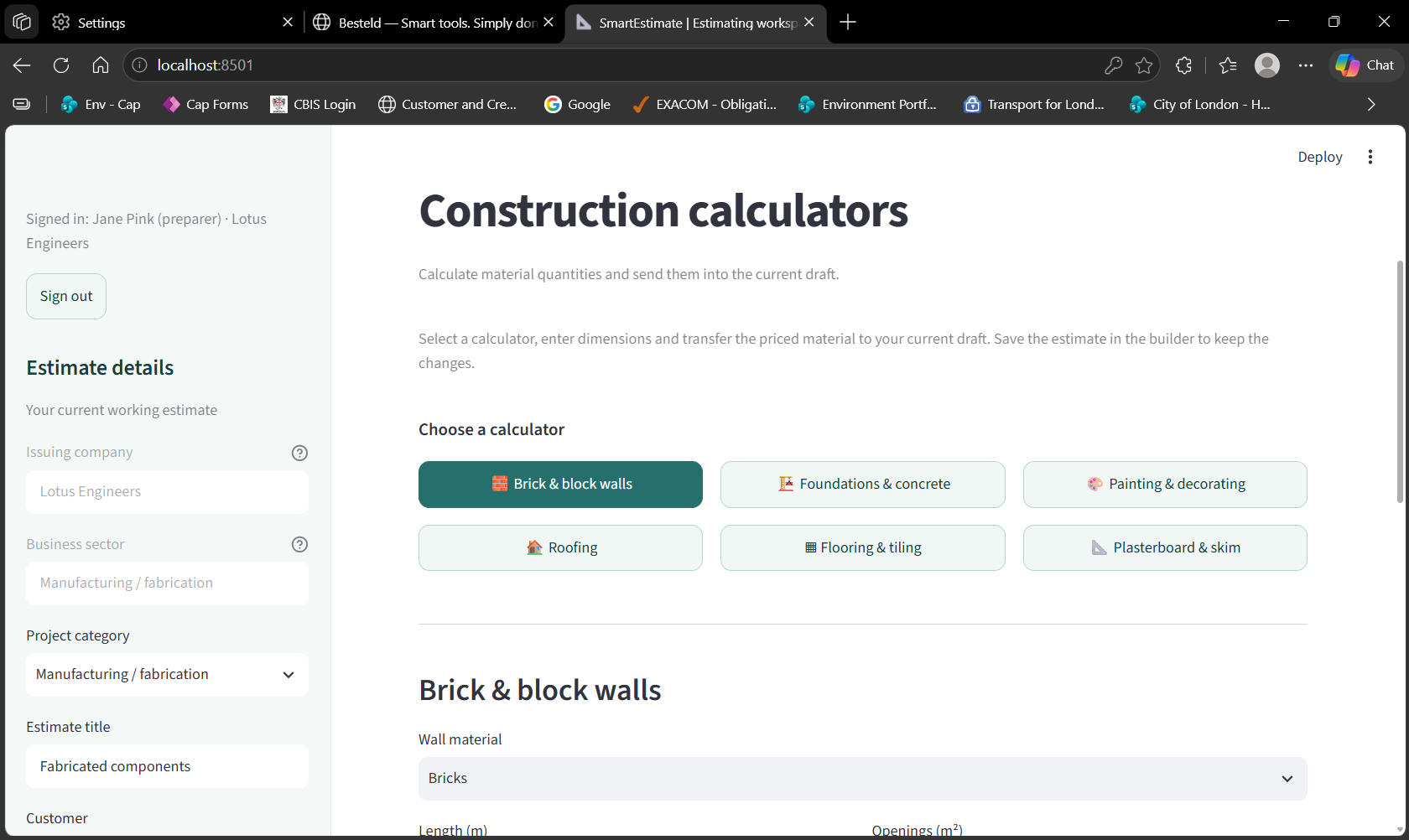
Construction calculators cover brick and block walls, foundations and concrete, roofing, flooring, decorating and plasterboard.
Enter dimensions and your own prices, then transfer calculated materials into the current draft estimate.
Explore the screen ↗Quantity estimates require checking against the job specification and supplier coverage.
A customer quotation for the selling price. A separate internal estimate for costs, suppliers and pricing analysis.
Explore sample documents created in SmartEstimate using fictional company and customer details.
Project scope, selling price, VAT, payment terms and an acceptance section. Internal costs and margins stay in the internal estimate.
Material and labour costs, overheads, contingency, margin and supplier information for internal review.
A separate editable template showing cost build-up and pricing formulas. Its example project differs from the PDF demonstration above.
Download Excel templateExample data only. PDFs are draft documents, not approved quotations or offers. Company details are configurable; ask about current branding options.
Turn quotation values into invoices that fit how you bill: in full, as a fixed deposit or partial amount, by percentage, or by percentage job completion.
SmartEstimate supports full quotation invoicing, fixed deposits and partial invoices, percentage-based invoicing and invoicing based on percentage job completion. You can also invoice selected quotation items where item selling prices exist. Sequential invoice references, an invoice register and issue confirmations are included, alongside an initial version of company-branded invoice PDFs.
See invoicing in a demo ↗Cloud estimating, quotations and invoicing for individuals and small teams.
Access SmartEstimate through your browser on a computer, tablet or phone with an internet connection. Work with company data stored in the cloud, with each company’s records kept separate.
Start your subscription by 31 December 2026 to receive 50% off your initial subscription term: one month on monthly billing or one year on annual billing. Subsequent renewals are charged at the full price. All prices exclude VAT; VAT will be added. Your discounted total will be confirmed before payment.
Renewals require a new payment; we send reminders and do not automatically charge you. Read the draft subscription terms.
Yes. Maintain your own items, costs, units and suppliers, import a CSV or Excel list, or use the catalogue’s internet search to find products to add. Review product specifications, units and current supplier prices before using them in an estimate.
Customer quotation PDFs, separate internal estimate PDFs, estimating Excel exports and an initial version of company-branded invoice PDFs. The downloadable samples above demonstrate estimates and quotations.
Yes. Invoicing includes full quotation values, fixed deposits and partial amounts, percentage-based invoices, and percentage job-completion invoices. You can also invoice selected quotation items where item selling prices exist. Sequential invoice references, an invoice register and issue confirmations are included.
The issuing company name and contact details are configurable. Ask us about logo support and the current document layout before choosing your setup.
Yes. SmartEstimate is a cloud-based application accessed through your browser on a computer, tablet or phone. An internet connection is required. Individual includes one named user; Small Business includes up to five active named users working with shared company data. No Windows installation is required.
Individual costs £14.99 per month or £149.99 per year for one named user. Small Business costs £29.99 per month or £299.99 per year for up to five active named users. All prices exclude VAT. Start by 31 December 2026 for 50% off your first monthly or annual term; subsequent renewals are at full price.
Structured estimates, invoices, payment records, company settings and issue-time document data are stored in a centrally hosted database, with company records kept separate. PDFs are generated on demand for download to your own computers or servers; Besteld does not permanently store the generated PDF files.
On Small Business, your company administrator can add, deactivate or remove and replace named users. No more than five users can be active at once; deactivating a user frees a seat. Accounts must not be shared.
Full access continues until your paid-through date, followed by a 14-day grace period with full access. After that, you have read-only access to existing records. Suspended accounts are blocked.
Have a process that takes longer than it should? Let’s look at what could be simpler.
Discuss ways to reduce repetitive spreadsheet tasks, combine information and simplify everyday updates.
Explore clearer reports and practical tools for reviewing the information your business relies on.
Talk through a specific workflow and identify whether a focused software tool could help.
Besteld is built around a straightforward idea: business tools should make everyday work easier to manage.
Our focus is practical software, spreadsheet automation and clear reporting. We start with the task, understand the process and look for a sensible way to improve it.
Smart tools. Simply done.Tell us what you estimate and how you work. We can walk through SmartEstimate using an example relevant to your business.
Email us, or send your enquiry using this form. Please do not include passwords, payment details or sensitive information.